
Between client pitches, team meetings across three time zones, media briefings, and recording The Spin Chicks with my co-host Erika Hirschfield a couple times a month, I’ve been on more video calls than I can count. And I’ve learned more from the bad ones than the good ones. The face lit like a hostage video. The audio that cut out right when the audience was leaning in. The screen share that opened to family photos. I’ve seen it all from every seat: as the presenter, as the interviewer, and as the audience member trying to stay polite.
Recently I was doing some spring cleaning on my Mac. I ran across a folder titled READ LATER and I saw this Forbes piece by Dana Brownlee. Written in 2020, it’s about the four home office items you need to present virtually. Reading it, I found myself nodding through the whole thing. She’s right. After years of Zoom calls and webinars, I can tell you people decide in about three seconds whether they’re going to keep paying attention. Your setup makes that decision for you before you say a word.
Here’s four tips, plus one I’d add as a bonus.
1. Get an external webcam
The camera built into your laptop is doing its best. But an external webcam is a noticeable improvement, and it lets you put the camera where it belongs. That place is at eye level with your eyes sitting about a third of the way down the frame. I’ve found you don’t need to spend money on tripods and mounts when a stack of books under the laptop does the exact same thing. Keep it simple.
2. Fix your lighting now, not the morning of
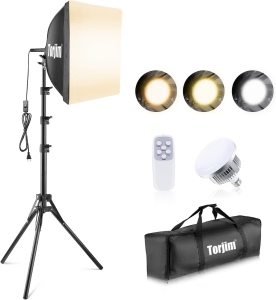 I say this with love: stop dragging lamps around your office four minutes before a call. Buy one dedicated light and set it up once. A ring light is the easy answer, but if you wear glasses, it’ll bounce right off your lenses. An LED panel or soft box solves that. But before you buy anything, measure your space. Don’t buy a lighting kit that is made for a convention hall. Here’s one I like that I found on Amazon, featuring a great price.
3. Please, an external microphone
If I could only fix one thing on most people’s setups, it would be sound. This is the one the podcast really drove home for me. We’ve had incredible guests with incredible stories, but the episodes that are hardest to edit are never the ones with a boring answer. They’re the ones where someone was talking into a laptop from across the room. Bad video is forgivable. Bad audio is not. A simple USB mic on your desk makes a huge difference. Even better, read my blog on podcast mics: we use the Yeti mic. It’s worth the money.
4. Clean up what’s behind you
This one is free. A plain wall, a bookshelf, a corner that says something about you without stealing the scene. Virtual backgrounds are fine in a pinch, but they chew up bandwidth and never look quite right. A couple of years ago I had a number of calls with a woman who used a beach scene as her background. It was so distracting! Whatever you land on, record a 30-second test and watch it back like a critic. Then silence the doorbell camera, the phone, the desktop notifications, and smile big.
5. Test it all before you log on
I’ve sat through webinars where the presentation wouldn’t open and the presenter had no backup. Why? Because they hadn’t planned for the first one not to work. Don’t be that person. Is your presentation ready? Will it open on the first page? Do you have two copies? Did you do a Zoom call before the call to test it all out? Even more so, are all your windows closed so you don’t show family pictures from your last vacation when you share your screen?
The thing nobody wants to hear
The best advice in Brownlee’s piece has nothing to do with buying anything. Record yourself with what you already own, watch it honestly, and only spend money on what’s actually broken. You don’t need the mic everyone on LinkedIn is using. You need one that works. So when it’s time to present you’re thinking about your message instead of fiddling with settings.
Get the setup right, get it out of the way, and let the story do the work.
If you want a second set of eyes on how you show up on camera, including your public speaking skills, I’m happy to take a look. Contact me and we’ll set up a call.